How to create good services in Plan✕
How to structure flows in Plan✕
How to write good planning service content
How to write automations in Plan✕
How to use the calculator component
How to maintain good services in Plan✕
How to publish new content
Publishing principles
Keep your service up-to-date using a publishing schedule
Test new content using the preview link before publishing
Push an ad hoc publish to repair high volume submission journeys
Push an ad hoc publish to repair false negative results for high volume guidance journeys
- How to review live feedback and request content changes
How to use the Plan✕ Editor
The PlanX editor is a work in progress: In the initial phases of development, we mainly focused on the user interface. We are now developing a more user-friendly editor too. However, you might still experience some weird interactions, missing features, crocodiles and other hazards to watch out for. Nonetheless, it’s still pretty cool - help us make it even better!
Introduction to the PlanX editor
Setting up a new service in PlanX
Adding a question to a flow in PlanX
Adding logic rules to a flow
Flags and results
Adding data to the passport
Basic automations
Automations with blanks
Advanced automations
Using the set component
GOV.UK Pay Metadata
upload video link
Clones
Internal flows
External portals
Publishing flows
Publishing flows_1
Publishing flows
Publishing flows_2
A/B Testing in Plan✕
Sometimes you might want to ‘A/B test’ different versions of service content, to see the impact that differences make to users by looking at analytics for a large sample group. You can now do that in Plan✕, using the calculate component. Here’s how:
Interface and navigation
User Interaction
Common Components
Flow Design
New Plan✕ features and updates are developed and tested across multiple environments.
As a council officer, you will mainly come across three environments:
- The production environment (https://editor.planx.uk): This environment is for writing content and building your flows using the Plan✕ Editor. It should not be used for testing integrations **(e.g. ‘Pay’ and ‘Send’ components).
- The staging environment (https://editor.planx.dev): This is the testing environment. It should **be used for testing integrations (e.g. the ‘Pay’ and ‘Send’ components). It should not be used to write new content, as it will be automatically deleted at midnight.
- Pizza links: These are temporary links that are sometimes used for the purpose of testing specific features.
- The Plan✕ Editor now has a Edit History and a Restore functionality. This means you don’t need to panic if you accidentally delete something. You can open the Edit History on the left menu of your screen and click ‘restore’ to go back to the previous version.
Get a copy of the breadcrumbs or passport to report an issue
- Sometimes when you’re running through a service and something goes wrong you’ll want to grab a copy of the ‘breadcrumbs’ (all the answers provided as data) or ‘passport’ (all the answers with a given field).
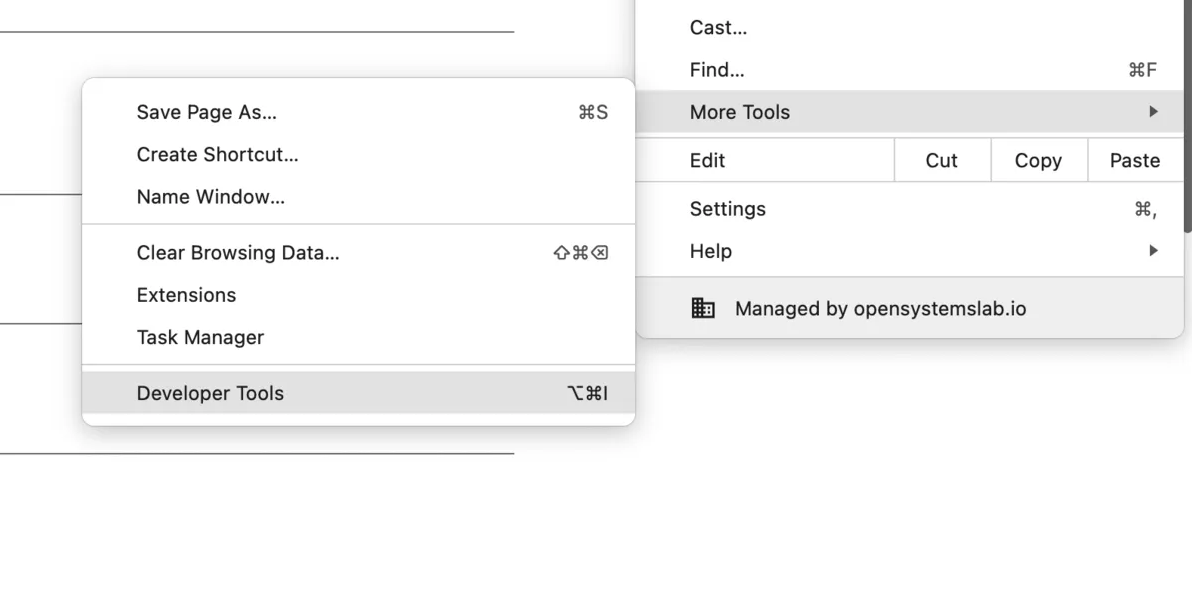
- In your browser, go to the three dot menu in the top right, and find developer tools (or 'console') (see image from Chrome)
- Paste one of the codes below into the console and hit enter.
- Go to a slack thread or text document and hit paste (Ctrl V) and it should paste the data in.
- Go back to the console and enter the other one and paste that in too.
- Voila! You have the passport and breadcrumbs to share!
To get the passport:
copy(window.api.getState().computePassport())
To get breadcrumbs:
copy(window.api.getState().breadcrumbs)
Something missing? Just let us know your ideas for videos you’d like us to add to this library