Initial M&E Impact results for Resource Time
As part of the development & testing of PlanX and BOPS products, 4 LPAs carried out Pilots over the period Oct 24 – Oct 25, and measured the impact of the new product stack on resource time needed to process applications
The results confirmed or slightly improved the results of the low volume 2024 Spot tests and are now available for business case or procurement support use.
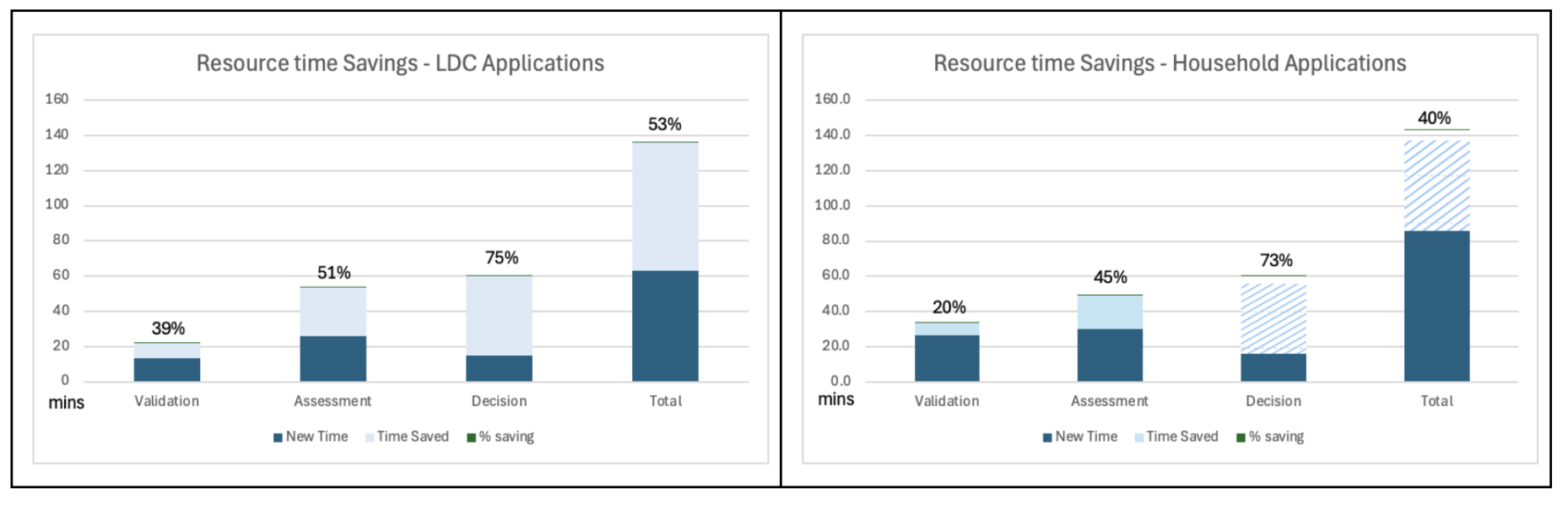
LDC resource time savings = 53% 73mins (vs 42% spot test) 136 baseline vs 63 mins/appn
- HH resource time savings = 40% 57mins (vs 42% spot test) 143 baseline vs 86 mins/appn
Further increases in measured savings are likely in beta pilots to be run in early 2026 which will include testing of improved validation phase features for document naming and indexing, and improved assessment phase features for consultation, officer reports and site/press notices.
First round PlanX + BOPS Pilots Results Summary Report (Sep 25)
Initial M&E Impact Results for % applications Valid On Receipt
Results of the first Pilot phase for LDC applications showed an increase in the % valid on receipt from 73% to 95%.
Early HH results are also encouraging, but we need more sample volume before drawing any conclusions
Largest reductions were seen on errors associated with CIL form, Application form, Fees and Supporting documents. The product team are now focussing on improving features and user guidance to support submission of documents.
Apply for Planning Permission M&E - introduction
First we consider how we use the information that M&E gives us (why we collect it), how we chose the key measures that we ask councils to track, and where you can find the data needed to do that.
Where and when should you report M&E results?
You should report monthly data for at least 1 month before launch (baseline) and 6 months after launch
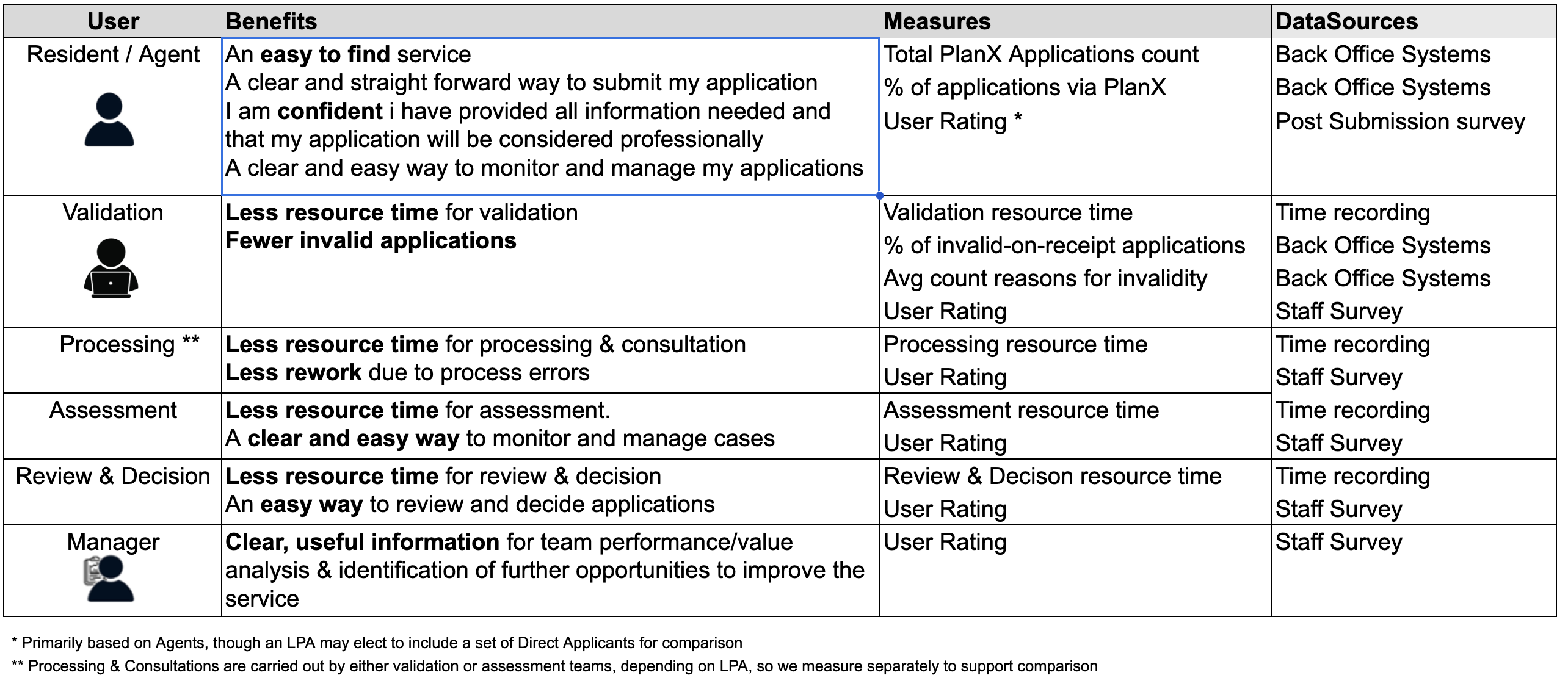
Who benefits and how?
- Residents / Agents – Need an easy-to-find service that provides a clear and straight forward way to submit their application so that they are confident they have provided all information needed. Agents additionally need a clear and easy way to monitor and manage their applications
- Validation Officers – Benefit from fewer invalid applications and so less average time spent on each application
- Processing Officers – Benefit from a clearer user interface and so less average time spent on each application
- Assessing Officers – Benefit from a clearer user interface and back office links to geographic and policy data, so less average time spent on each application
- Review and Decision Officers – Benefit from a clearer user interface and presentation of information, so less average time spent on each application
- Planning Team Managers – Gain clear insights into service performance and opportunities for improvement.
How do we measure the impact of the Apply for Planning Permission service?
- Ease of access – What proportion of applications come via the new service?
- Completion rates – How many people finish submitting an application?
- Resident / Agent satisfaction – We capture this through a survey.
- Officer workload – How much time is spent validating, processing, assessing and reviewing applications?
- Manager insights – Are managers gaining valuable data on service performance?
Where to find the data
- Back-office system reports – The system used by the planning team will provide dates of submission, validation and decision, details of development, applicant type, and submission channel, and reasons for any application invalidity
- PlanX analytics – A dashboard provided as part of the planX service that provides tracking of user interactions, completion rates, and drop-off points.
- Time Recording – Manual recording of the time spent by staff at each stage of application consideration provides workload data
- User and Staff surveys – provide a way of gathering feedback from applicant and staff
Apply for Planning Permission M&E – data sources – Back Office System
To support this monitoring, every council using Apply collects a small but standardised set of indicators. These measures can be generated by almost all planning back office systems. They include the total number of applications received, broken down by type (such as LDCs and householder applications) and by channel—PlanX, the Planning Portal, email, or paper. Councils also record the applicant type (agent or direct applicant), whether the application was valid on receipt, and the specific reasons for invalidity where relevant. Timeline data, such as submission-to-validation and submission-to-decision durations, completes the performance picture and helps track whether Apply is speeding up key processes.
All of this information is compiled into two monthly reports, both designed specifically to support the monitoring and evaluation of the Apply for Planning Permission service.
The first is the Monthly Applications CSV, a six-month rolling spreadsheet where each row represents one application. Required fields include application date, applicant type, channel of submission, the back office system used, whether the application was valid on first submission, the result, and key dates such as validation and decision. Councils follow the standard Data Definition Document to ensure every field uses the correct format and allowed values, guaranteeing consistency across all participating LPAs. It is important for impact analysis to check that the applications that are submitted via PlanX have that value in the Channel field.
The second requirement is the Detailed Reasons for Invalidity CSV. This report provides a deeper view into why applications submitted through Apply (and other channels) are not valid the first time. Because individual councils historically used different wording and categories, the M&E Working Group established a standardised list of invalidity reasons. Each council maps their own internal reason codes or free-text notes to this shared framework. This allows meaningful comparison across authorities and helps identify recurring issues that Apply could address in future improvements.
Producing both reports involves four straightforward steps. First, the right data must be accessed: councils need appropriate system permissions and an understanding of where all relevant information lives, including any spreadsheets used outside the main case management system. Second, the data must be transformed—renaming columns, reformatting dates, mapping codes, and cleaning inconsistencies to match the shared definitions. Third, the reports are assembled, checked for completeness, and validated against the required standards. Finally, the completed CSV files are submitted monthly to the monitoring and evaluation team through email or the agreed shared location.
Councils can produce these reports using built-in back office export tools combined with Excel or Power Query, or by using Power BI for a more automated, reusable workflow.
Although common challenges include inconsistent recording practices or limited analytical capacity, these can be managed through early coordination with validation teams, clear internal agreements on where data should be recorded, and support from the ODP community.
By following this structured approach, councils can generate reliable data that strengthens the monitoring of the Apply for Planning Permission service and drives ongoing improvements for applicants and officers alike.
Apply for Planning Permission M&E – data sources – PlanX Dashboard
The PlanX Analytics Dashboard provides information that helps us understand how many sessions begin, how many users complete the journey, and what feedback residents give.
The Key Figures page shows sessions started and applications submitted
Not every session ends with a submission. Some users drop out mid-journey, which may indicate confusion or difficulty answering a question. These are shown as mid-service exits and are important for identifying opportunities to improve the wording or logic of the service.
From these figures we can calculate Completion rate = reports submitted / sessions started
The User Feedback page provides a useful signal of user satisfaction.
Monthly data from the PlanX Dashboard should be added to the M&E framework for at least 6 months after launch.
Apply for Planning Permission M&E – data sources – resource time recording
Resource time is one of the core measures used in the M&E framework for planning permission applicaton services. It helps councils understand how much officer effort the planning application process requires, both before and after adopting the new digital tools.
First, the difference between elapsed time and resource time. Elapsed time is the amount of clock time between two events, such as submission and decision, and is normally recorded automatically in back-office systems. Resource time measures the actual working time an officer spends on each phase of an application giving a more precise picture of workload and helps identify where improvements in the digital service could reduce effort.
LPAs are asked to record resource time for four phases of every planning application they monitor: validation, processing (consultation), assessment, and review/decision. Each application produces four rows of data, one per phase. For each row, councils should record the application number, application type, phase, resource time, the officer handling it, and an application complexity category—simple, complex, or refused. This complexity classification helps ensure fair comparisons, since different types of applications require different amounts of effort.
- Simple = HH one extension and not in CA, LDC proposed compliance with GPDO Schedule 2
- Complex = HH more then one extension and/or in CA, LDC existing compliance with GPDO Schedule 2 and others
Time recording data must be collected both for applications processed under the existing system (to create a baseline) and for applications processed using the new digital workflow. Councils provide monthly updates while time recording is active. Because different planning teams use different systems, data may be gathered using built-in time recording tools, a PowerApp, or a shared spreadsheet. Regardless of the tool, the data should be stored in a consistent tabular structure so that it can be analysed and visualised.
Officers may forget to record their time, get interrupted, or feel wary about how the data might be used. To address this, councils should review the data weekly, identify gaps, discuss missing entries with officers, and note any unusual values. We recommend a “ramp-up period” where teams practise time recording while learning the new service and dual-processing steps. Data collected about the new service during this familiarisation period doesn’t count towards the required sample.
For reporting, the working group has produced a Power BI template that councils can download. This template allows LPAs to load their time-recording data, check data quality, review summary metrics, and generate the reports required for the M&E framework. Links to the template, setup guidance, and walkthrough videos are available below
The target sample sizes needed for meaningful analysis are 25 simple applications, 10 complex, and 10 refused. Councils are encouraged to collect more where possible, but the targets are designed to reflect realistic workloads..
Apply for Planning Permission M&E – data sources – Staff Survey
The staff survey comprises a small number of simple questions that you should ask your staff member to complete once the service has been live for about 3 months.
The questions are related to staff experience of the BOPS and Current back office systems, You’ll find a link to these questions at the bottom of this page
You may use a survey tool, like microsoft forms or google forms or even a simple spreadsheet or document– that’s up to you.
Once you have the results, update the Performance Framework results sheet with the average value for question H (On a scale of 0 to 10, how likely are you to recommend the BOPS service to another Council?) and share the other responses with the M&E Working Group and BOPS product team.
A few final tips: Use the survey as an opportunity to get some detailed feedback from staff. Emphasise that their feedback will help you influence any changes to the service. If you can, make some updates to processes on the basis of that feedback and run the survey again once those changes have been in place for a month.
Collaborate with other LPAs to share tools and ideas. And most importantly, stay connected to the M&E Working Group—ask for help early and share your learning. It helps everyone improve.
Reports
Standards Documents
Guidance Articles
Templates