Initial M&E Impact Results
As part of the launch of the RAB service, several LPAs have collected M&E data and measured the impact of the new product on the total volume of complaints received, the volume of unstructured complaints via channels email and phone calls, and the share of complaints that are invalid (missing information or not planning related). The results include:
- A 52% reduction in inbound enforcement complaints to the Medway planning team (where 93% of received complaints are now via the PlanX service), and a reduction in the share of complaints received that are invalid from 60% to 12%.
- A 23% reduction in the volume of unstructured complaints received via email and phone at Camden
We expect to update this in the first half of 2026 with results from new LPAs, and updated results from current LPAs who plan to increase the use of the service by implementing website updates and encouraging council members to use RAB.
Report a breach M&E - introduction
This video explains how we use the information that M&E gives us (why we collect it), how we chose the key measures that we ask councils to track, and explains where you can find the data needed to do that.
Where and when should you report M&E results?
You should report monthly data for at least 1 month before launch (baseline) and 6 months after launch
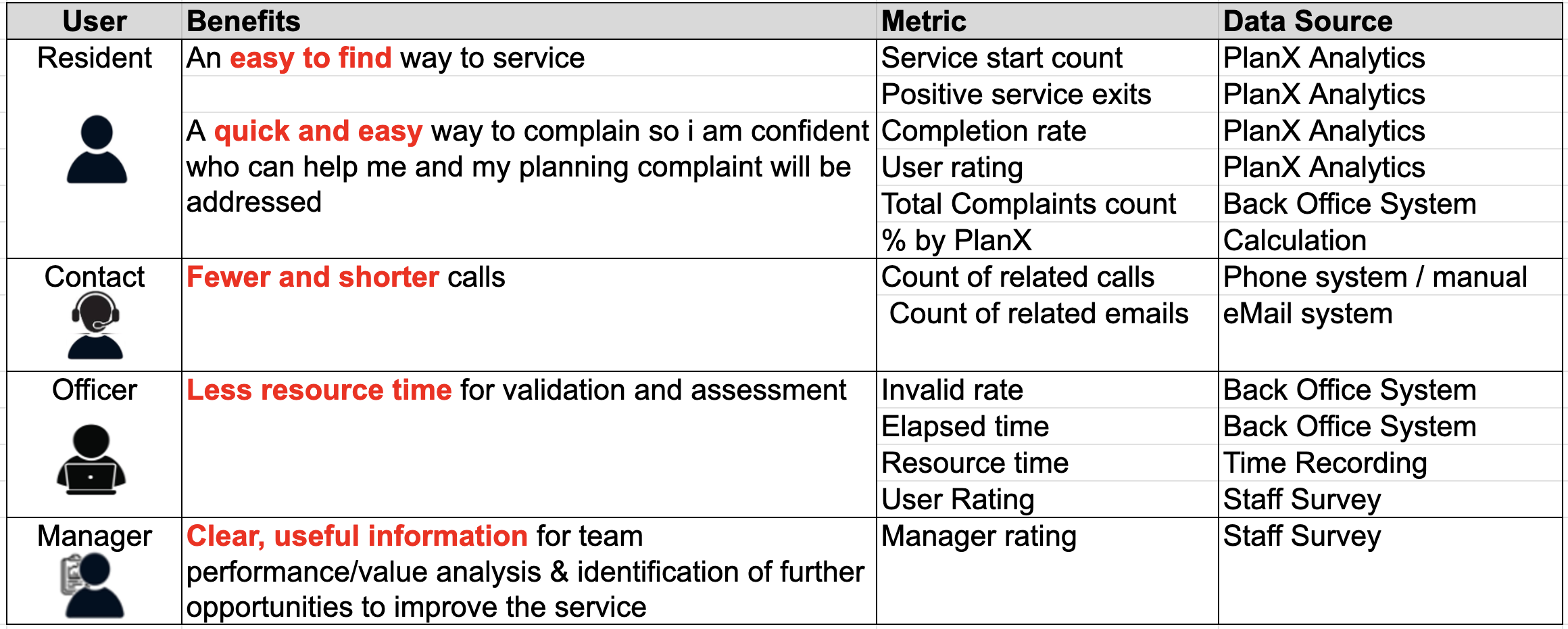
Who benefits and how?
- Residents – Need an easy-to-find service that helps them quickly submit complaints and feel confident their concerns are addressed.
- Contact teams / duty planners – Benefit from fewer, more relevant calls, saving time AND the option to point callers straight to the online service
- Enforcement officers – Spend less time filtering and verifying information.
Enforcement managers – Gain clear insights into service performance and opportunities for improvement.
How do we measure the impact of Report a Breach?
- Ease of access – What proportion of complaints come via the online service versus phone or email?
- Completion rates – How many people finish submitting a complaint?
- User confidence – Are residents confident they’ve done the right thing? We capture this through a survey.
- Reduction in contact handling workload – Are fewer calls coming through about these issues?
- Officer efficiency – How much time is spent validating and assessing complaints?
- Manager insights – Are managers gaining valuable data on service performance?
Where to find the data
- Back-office system reports – The system used by the enforcement team will provide dates of submission and response, subsequent actions taken and perhaps whether the planning related submissions provided all of the necessary information.
- PlanX analytics – A dashboard provided as part of the planX service that provides tracking of user interactions, completion rates, and drop-off points.
- Inbound call and email counts – May be available from the contact team or duty planner.
- Staff surveys – provide a way of gathering feedback from enforcement teams and managers."
Report a breach M&E – data sources – Back Office System
Back-office data helps measure the volume of complaints submitted, the channels used (PlanX, email, phone), whether complaints are valid on receipt or need further information, and the time taken between submission, officer review, and final resolution.
The standard CSV extract from the back-office system includes one row per enforcement case, using standardised column names and formats outlined in the official data definition document (see below in the Standards section of this page). Required fields include case reference, submission date, back-office system used, outcome values, and submission channel.
The process of producing these reports follows four steps: (1) accessing the enforcement data, which may require IT permissions or gathering files held outside the main system; (2) transforming the data to match standard definitions; (3) producing the CSV or Excel table for the required date range; and (4) using the table to add data to the M&E framework report
LPAs can generate reports using either the reporting tools built into their back-office system or an external tool such as Power BI. Power BI is the most widely used method in the M&E working group and LPAs can build reports from scratch or use the pre-built Power BI template provided (see below in the Standards section of this page).
Common challenges include missing or inconsistent outcome records and limited access to data analysts. LPAs are encouraged to review their current processes early, speak with enforcement teams about data entry practices, use shared guidance and templates, and seek peer support from the ODP M&E working group. Many LPAs have updated their internal processes after adopting the standard methods described.
Report a breach M&E – data sources – Phone calls and Emails
Data on phone calls usually sits in one of three places: a central call-handling platform, a CRM used by a contact centre, or the planning team’s own records (often in the back-office system). The first job is to identify who actually takes enforcement-related calls (central customer contact team, duty enforcement officer, or a mix of both), and what systems they use to log call details. Two common problems quickly appear: not all calls are recorded (for example, only “valid” cases make it into the system) and the recorded information is often too vague (“planning enquiry” with no detail about enforcement vs other issues).
To fix this, councils may need to change how calls are coded – for example, adding extra “reason” categories, a specific enforcement option, or agreeing a temporary manual recording period (such as a shared spreadsheet completed by duty officers). Some authorities have had to go through slow formal change processes or wait for annual contract reviews to update systems, but those who have done this are now benefiting from much richer data.
Email data follows similar principles. Councils are asked to identify who manages inbound enforcement emails (central contact team, validation team, or duty officer) and how emails flow through systems such as Outlook/Exchange, shared mailboxes, CRMs, or back-office systems. Depending on the setup, options range from counting archived emails manually to creating a dedicated shared mailbox for enforcement complaints, and using Outlook rules to auto-copy messages into an archive for later analysis. For more advanced automation, tools like Power Automate can extract metadata into a CSV and generate regular reports – though this may require IT support and a data protection impact assessment.
Because this is a “before and after” measure, councils are advised to collect at least one month of baseline call/email data before launch, and then monthly data for at least 6 months after launch.
Report a breach M&E – data sources – PlanX Dashboard
The PlanX Analytics Dashboard provide s information that helps us understand how many sessions begin, how many users complete the journey, and what feedback residents give.
The Key Figures page shows sessions started and reports submitted
Not every session ends with a submitted report. Some users drop out mid-journey, which may indicate confusion or difficulty answering a question. These are shown as mid-service exits and are important for identifying opportunities to improve the wording or logic of the service.
Some users are intentionally redirected because their issue is not planning-related or associated with a permitted development. These are positive service exits — the system has successfully identified that the issue is not planning related or perhaps is a permitted development. This is considered a successful outcome, as the resident gets clarity immediately instead of waiting for an officer to respond.
From these figure we can calculate Completion rate = (reports submitted + positive exits) ÷ total sessions started
The User Feedback page provides a useful signal of user satisfaction.
Monthly data from the PlanX Dashboard should be added to the M&E framework for at least 6 months after launch.
Report a breach M&E – data sources – Surveys
The staff survey comprises a small number of simple questions that you should ask your staff member to complete once the service has been live for about 3 months.
The questions are related to how long it takes staff to review complaints to determine if they need further information or are not related to planning, and ask for any other feedback staff can provide. You’ll find a link to these questions at the bottom of this page
You may use a survey tool, like microsoft forms or google forms or even a simple spreadsheet or document– that’s up to you.
Once you have the results, update the Performance Framework results sheet and share the details with colleague sin the M&E Working Group who may be able to provide you with perspective and ideas from their councils
A few final tips: Use the survey as an opportunity to get some detailed feedback from staff. Emphasise that their feedback will help you influence any changes to the service. If you can, make some updates to processes or the basis of that feedback and run the survey again once those changes have been in place for a month.
Report a breach M&E - council experiences
This panel discussion brings together three councils—Medway, Gloucester, and Barnet—to share practical insights on monitoring and evaluation (M&E) for the Report a Breach service.
Why Enforcement Is So Challenging. All three councils describe a familiar picture: enforcement teams receive a huge variety of complaints, ranging from genuine planning breaches to issues they cannot control—civil disputes, boundary disagreements, hedge cutting, noise, or even drones. Much of this arrives as long, unstructured emails or unclear messages that take significant time to read, categorise, and redirect.
Why Councils Adopt Report a Breach. Each council had different motivations, but the goals overlap:
- Reduce invalid or irrelevant submissions
- Help residents get an instant answer when their issue is not a planning matter
- Improve the quality of reports so officers no longer need to chase for missing information
- Consolidate multiple contact channels (phone, email, forms) into a single, structured service
- Save officer time and reduce waiting times for residents
Lessons Learned.
- Start early with data protection (DPIA) processes.
- Engage partners—web teams, contact centres, IT—early and clearly.
- Establish measurement needs at the same time as defining user needs.
- Use staff surveys where precise operational data is difficult to extract.
- Expect some measures to take months to show meaningful change.
Final Advice
- Bring enforcement teams, planners, web teams, and councillors along early.
- Clearly articulate why you’re launching the service before deciding how to measure it.
- Share learning and ask the M&E Working Group for help.