Initial M&E Impact Results
As part of the launch of the FOIYNPP service, several LPAs have collected M&E data and measured the impact of the new product on the total volume of related phone calls and emails received. Initial results show
- An average of 49% reduction in related inbound calls and emails
We expect to update this in the first half of 2026 as other LPAs launch the service, and explore the use of the PlanX product to meet other resident needs for information
Find Out If M&E - introduction
This video explains how we use the information that M&E gives us (why we collect it), how we chose the key measures that we ask councils to track, and explains where you can find the data needed to do that.
Where and when should you report M&E results?
You should report monthly data for at least 1 month before launch (baseline) and 6 months after launch
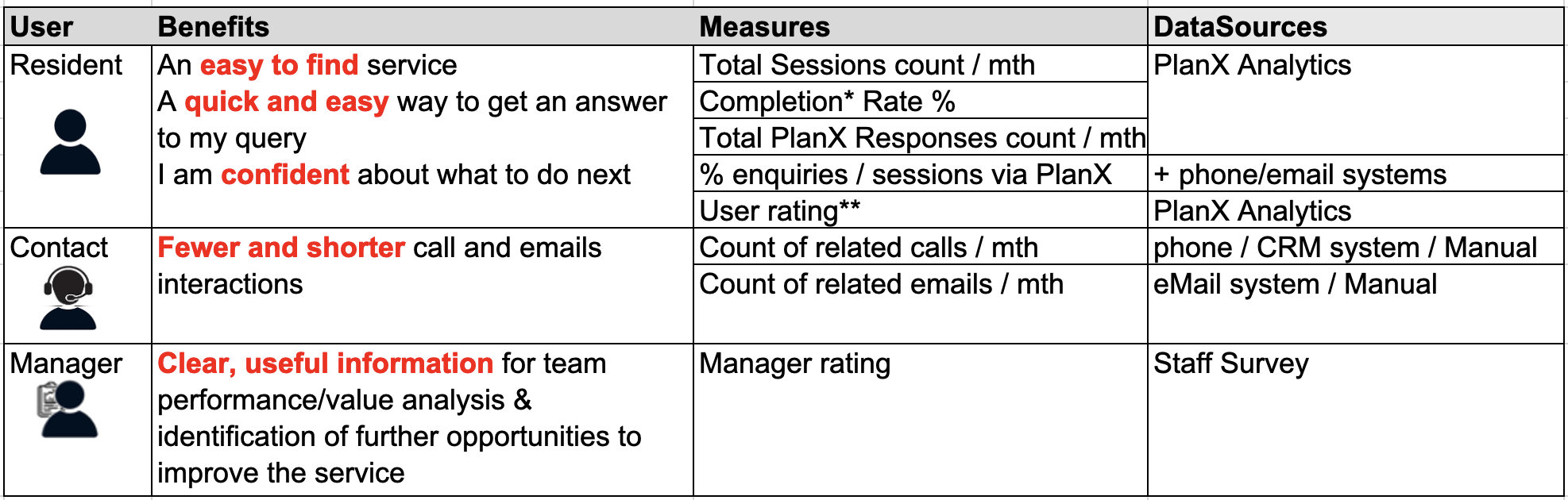
Who benefits and how?
- Residents – Need an easy-to-find service that helps them simply provide information about their proposed development, and quickly get a response
- Contact teams / duty planners – Benefit from fewer calls and emails, saving time AND the having the option to point callers straight to the online service
Planning managers – Gain clear insights into service performance and opportunities for improvement."
How do we measure the impact of ‘Find out If I need Planning Permission?
- Ease of access – What proportion of complaints come via the online service versus phone or email?
- Completion rates – How many people finish the service?
- User confidence – Are residents confident about what to do next? We capture this through a survey.
- Reduction in contact handling workload – Are fewer calls and emails coming through about these questions?
- Manager insights – Are managers gaining valuable data on service performance?"
Where to find the data
- Inbound call and email counts – May be available from the contact team or duty planner.
- PlanX analytics – A dashboard provided as part of the planX service that provides tracking of user interactions, completion rates, and drop-off points.
- Staff surveys – provide a way of gathering feedback from enforcement teams and managers."
Find Out If M&E – data sources – Phone calls and Emails
Data on phone calls usually sits in one of three places: a central call-handling platform, a CRM used by a contact centre, or the planning team’s own records (often in the back-office system). The first job is to identify who actually takes enforcement-related calls (central customer contact team, duty enforcement officer, or a mix of both), and what systems they use to log call details. Two common problems quickly appear: not all calls are recorded (for example, only “valid” cases make it into the system) and the recorded information is often too vague (“planning enquiry” with no detail about enforcement vs other issues).
To fix this, councils may need to change how calls are coded – for example, adding extra “reason” categories, a specific enforcement option, or agreeing a temporary manual recording period (such as a shared spreadsheet completed by duty officers). Some authorities have had to go through slow formal change processes or wait for annual contract reviews to update systems, but those who have done this are now benefiting from much richer data.
Email data follows similar principles. Councils are asked to identify who manages inbound enforcement emails (central contact team, validation team, or duty officer) and how emails flow through systems such as Outlook/Exchange, shared mailboxes, CRMs, or back-office systems. Depending on the setup, options range from counting archived emails manually to creating a dedicated shared mailbox for enforcement complaints, and using Outlook rules to auto-copy messages into an archive for later analysis. For more advanced automation, tools like Power Automate can extract metadata into a CSV and generate regular reports – though this may require IT support and a data protection impact assessment.
Because this is a “before and after” measure, councils are advised to collect at least one month of baseline call/email data before launch, and then monthly data for at least 6 months after launch.
Find Out If M&E – data sources – PlanX Dashboard
The PlanX Analytics Dashboard provides information that helps us understand how many sessions begin, how many users complete the journey, and what feedback residents give.
The Key Figures page shows sessions started and responses completed
Not every session ends with a response. Some users drop out mid-journey, which may indicate confusion or difficulty answering a question. These are shown as mid-service exits and are important for identifying opportunities to improve the wording or logic of the service.
From these figures we can calculate Completion rate = reports submitted / sessions started
The User Feedback page provides a useful signal of user satisfaction.
Monthly data from the PlanX Dashboard should be added to the M&E framework for at least 6 months after launch.
Find Out If M&E - council experiences
This panel discussion brings together two councils - Camden and Tewkesbury - to share practical insights on monitoring and evaluation (M&E) for the Find out if you need Planning Permission service
Ian from Camden describes how Camden had long considered dropping their traditional duty planner service, which required planning officers to handle daily inquiries that often included irrelevant or non-planning-related questions. David from Tewkesbury shares a similar story: their duty planner service was limited to one morning a week and was often staffed by junior planners who found it time-consuming and inconsistent. Both councils aimed to reduce the volume of routine inquiries and make the planning process more efficient.
When it comes to measuring the impact, David mentions that Tewkesbury tracked the number of duty planner appointments before and after launching the tool. They found a significant reduction in phone calls and emails, as well as a decrease in the time planners spent on these inquiries. Similarly, Ian describes how Camden used analytics from the PlanX dashboard to monitor usage and saw a notable drop in duty planner inquiries once residents had easier access to the online tool.
The video also highlights that both councils faced initial challenges in gathering baseline data and ensuring that all enquiries were logged consistently. However, both emphasize the importance of leveraging internal relationships—engaging IT teams, using the PlanX dashboard, and showing the tool to colleagues and stakeholders to gain buy-in and support.
Both Ian and David recommend starting early with data collection, making the tool easy to find on the council’s website, and using internal champions to promote its benefits.
- Bring customer service / contact teams along early.
- Clearly articulate why you’re launching the service
- Share learning and ask the M&E Working Group for help.
PlanX analytics - deep dive
This video is a deep dive into the analytics for PlanX - this knowledge sharing session applies to all PlanX services.