As of August 2025, the DPR is configured to receive information from any post-submission published application-compliant endpoint and the Back Office Planning System (BOPS) tool. If you have got BOPS set up, configuring an instance of the DPR is a straightforward process.
It is a manual developer task to configure a new instance of DPR, which will require a small amount of information from your LPA - you can begin this process via submitting this form.
More information about the required content is available here.
- The main items required are the BOPS API key(s) - you can speak to the BOPS team to help provide these, as well as your council logo in the appropriate format (svg).
- Initially, the team will provide a STAGING (test) environment, linked to your BOPS staging environment. This instance is for you to test how your data looks coming out of BOPS, and get used to the functionality of the DPR. This is also where you can support testing and feedback activities that will inform the development of the DPR.
- Once you are ready, the DPR team can provide a PRODUCTION (live) environment, again connected to your BOPS production environment. This will be where any live information from BOPS will be displayed. The live environment can be set to unlisted to allow you to validate before it becomes publicly accessible on the DPR homepage as well.
Technical Integration
The primary method to date for LPAs to use the DPR is via BOPS. This can be configured via the approach above. However DPR can receive data from any ODP compliant data source - the steps to configure this are below.
You can view the openAPI documentation for the endpoints here (swagger here), or download the file in yaml and json formats to use locally.
The following endpoints will be required to be implemented in your api in order to work with the DPR. Future development work will allow the DPR to support fewer endpoints, however for now these endpoints are required:
- GET /api/@next/public/applications
- GET /api/@next/public/applications/:applicationId
- GET /api/@next/public/applications/:applicationId/documents
- GET /api/@next/public/applications/:applicationId/publicComments
- POST /api/@next/public/applications/:applicationId/publicComments
- GET /api/@next/public/applications/:applicationId/specialistComments
- GET /api/@next/public/applications/:applicationId/specialistComments/:specialistId
Using the Digital Site Notice
As of September 2025, the DSN is not in active development - and functionality is being rolled into DPR. Existing DSN installations will continue to function but are not actively supported. It is still possible to set up a DSN instance (open source code is here) - but it is recommended to discuss with the Camden/ DPR team before progressing further as it might not be the best solution for your use cases.
Information about configuring the DSN can be found here, or in video format here (note these resources are from 2024).
Service Specification
User Interfaces and Devices
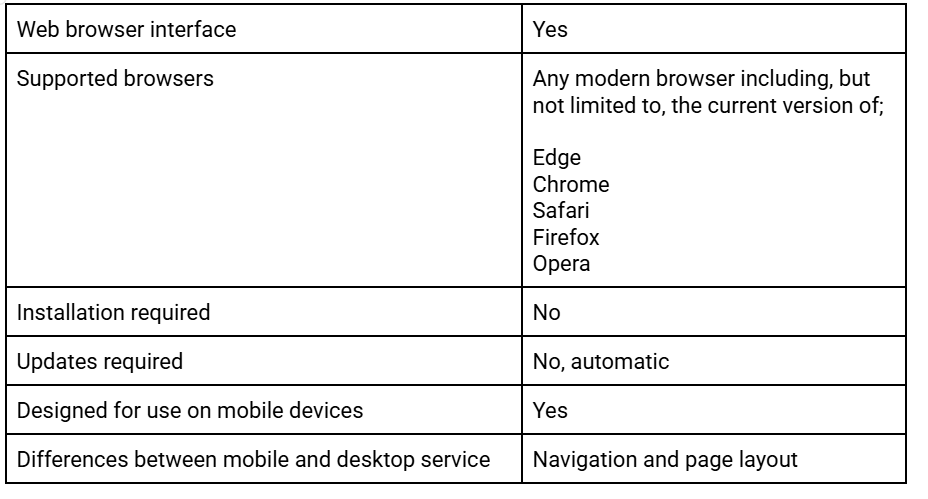
System Architecture
Code Repositories
What User Data does DPR Handle?
This document has common data processing questions and answers
Integrations
Current integrations with Back Office Systems
- You can currently use the DPR with BOPS
Integration Strategy
As of summer 2025, the DPR team focussed on refactoring the core product to enable agnostic support from other back office planning systems, by accepting any data in the agreed ODP schema format, see the technical integration and development of the DRP sections above for more information
API & Post-submission Schema
DPR is currently using the latest version on main:
OpenAPI docs:
DPR API specifics:
- Requires x-client and x-service headers to route requests to the correct handlers
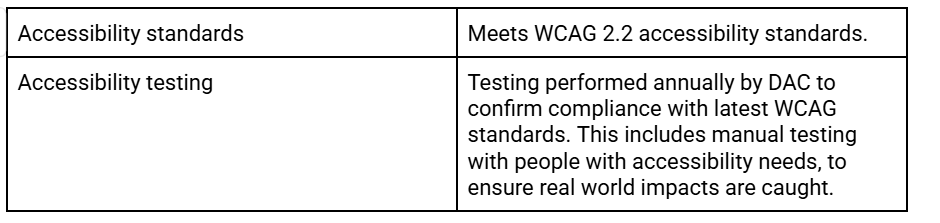
Accessibility
Security
The product has been penetration tested by certified third parties, report available on request.
Hosting
Support
Support for councils using the DPR is provided through TPXimpact, via Camden council. This is currently ad-hoc during the testing and validation process. Currently there is no need to sign a formal support agreement or pay any sort of ongoing fee for support of the DPR product.
For support issues, posting on Slack in the help-issues-odp-products channel in the first instance is the best option.